You signed in with another tab or window. Reload to refresh your session.You signed out in another tab or window. Reload to refresh your session.You switched accounts on another tab or window. Reload to refresh your session.Dismiss alert
Reasoning Promise.all Improvements in Inference and Promise.all)
The latest version of TypeScript (approx. 3.7) is Promise.all and Promise.raceUpdated function declarations such as .
Unfortunately, especially null or undefinedWhen mixing values with , a slight regression occurred.
interfaceLion{roar(): void}interfaceSeal{singKissFromARose(): void}asyncfunctionvisitZoo(lionExhibit: Promise<Lion>,sealExhibit: Promise<Seal|undefined>){let[lion,seal]=awaitPromise.all([lionExhibit,sealExhibit]);lion.roar();// 오 이런// ~~~~// 객체는 아마도 'undefined' 일 것입니다.}
This behavior is strange! sealExhibitprice undefinedIncluding the is somehow lion On Type undefinedInject the .
Jack Batesof pull request Thanks to this, the reasoning process in TypeScript 3.9 has been improved.
The above error no longer occurs. PromiseIf you've struggled with previous versions of TypeScript because of issues related to , I recommend using 3.9.
awaited What is a type? (What About the awaited Type?)
If you've been looking at issue trackers and design meeting notes, awaited A new operator namedYou will be aware of some operations on .
The goal of this type operator is to use JavaScript Promiseis to model exactly how you solve it.
Initially, in TypeScript 3.9 awaited, but by running an initial TypeScript build with an existing code base, we found that this feature required more design work before it could be seamlessly deployed to all users.
As a result, we decided to remove this feature from the main branch until we became more certain.
We'll be experimenting more with this feature, but we won't be offering it in this release.
Speed Improvements
TypeScript 3.9 includes many new speed improvements.
Our team focused on performance after seeing that the edit/compilation speed was very poor when using packages like material-ui and styled-components.
We did an in-depth analysis with a variety of pull requests that optimize specific pathological cases involving huge unions, intersections, condition-specific types, and mapped types.
Each of these pull requests reduces compile time by approximately 5-10% on a particular code base.
In total, the compile time of material-ui has been reduced by about 40%!
In addition, the ability to change the file name in the editor scenario has been partially changed.
We were told by the Visual Studio Code team that it can take 5 to 10 seconds to figure out which import statement needs to be updated when renaming a file.
TypeScript 3.9 is Internal changes in the way compilers and language services cache file lookupsto resolve this issue.
There's still room for improvement, but we hope this will lead to a faster experience for everyone!
Write a library in TypeScript and as part of the public API doStuffImagine exporting a function named
Allowing TypeScript users to receive type-check errors doStuff The type of the function is two string, but also does a runtime error check to provide useful errors to JavaScript users (only during development builds).
functiondoStuff(abc: string,xyz: string){assert(typeofabc==="string");assert(typeofxyz==="string");// 어떤 작업을 하세요}
So TypeScript users will receive useful red error underscores and error messages if they use the function incorrectly, and JavaScript users will get assertion errors.
To test this behavior, I'm going to write a unit test.
expect(()=>{doStuff(123,456);}).toThrow();
Unfortunately, if the above test is written in TypeScript, TypeScript will throw an error!
doStuff(123,456);// ~~~// 오류: 'number' 타입은 'string' 타입에 할당할 수 없습니다.
That's why TypeScript 3.9 introduced new features: // @ts-expect-error Tin.
Before the line // @ts-expect-error If annotated, TypeScript stops reporting the error;
However, if the error does not exist, TypeScript // @ts-expect-errorwill report that it is not needed.
ts-ignore or ts-expect-error? (ts-ignore or ts-expect-error?)
In a way, // @ts-expect-errorprice // @ts-ignoreSimilar to , it can act as a suppression comment.
The difference is // @ts-ignoremeans that if there is no error on the next line, do nothing.
Existing // @ts-ignore Comments // @ts-expect-error, and you may be wondering what would be a good fit for your future code.
It's entirely up to you and your team, but we have some ideas on which one to choose in which situation.
If the following are the cases: ts-expect-errorSelect :
If you want to write test code where the type system causes an error in its operation
If you want a fix to happen quickly and you need a quick solution
If you are working on a moderate-sized project led by an innovative team that wants to delete suppression comments as soon as the code that has encountered the error becomes valid again.
If the following are the cases: ts-ignoreSelect :
If you have a larger project and have a hard time finding a clear responsible person for new errors in your code.
You are upgrading between two versions of TypeScript, and you are getting a code error in one version but not in the other.
If you honestly don't have time to decide which option is better.
Uncalled Function Checks in Conditional Expressions
To report an error if TypeScript 3.7 forgets to call a function _Check an uncalled function_Introduced.
functionhasImportantPermissions(): boolean{// ...}// 이런!if(hasImportantPermissions){// ~~~~~~~~~~~~~~~~~~~~~~~// hasImportantPermissions 함수가 항상 정의되어 있기 때문에, 이 조건문은 항상 true를 반환합니다.// 대신 이것을 호출하려 하셨나요?deleteAllTheImportantFiles();}
However, this error is if Applies only to the terms of the inquiry. Alexander Tarasyukof a pull request Thanks to this, this feature also supports ternary conditional operators (e.g. cond ? trueExpr : falseExpr syntax).
declarefunctionlistFilesOfDirectory(dirPath: string): string[];declarefunctionisDirectory(): boolean;functiongetAllFiles(startFileName: string){constresult: string[]=[];traverse(startFileName);returnresult;functiontraverse(currentPath: string){returnisDirectory ?
// ~~~~~~~~~~~// isDirectory 함수가 항상 정의되어 있기 때문에,// 이 조건문은 항상 true를 반환합니다// 대신 이것을 호출하려 하셨나요?listFilesOfDirectory(currentPath).forEach(traverse) :
result.push(currentPath);}}
The TypeScript compiler affects not only the TypeScript writing experience of the major editors, but also the JavaScript writing experience of the Visual Studio family of editors.
Using the new TypeScript/JavaScript features in the editor will vary depending on the editor.
Visual Studio 2017/2019 has [SDK installer] and Installing MSBuildThere is.
Sublime Text 3 is Select a different version of TypeScriptSupported.
CommonJS Auto-Import in JavaScript
The auto-import functionality for JavaScript files that use the CommonJS module has been greatly improved.
In previous versions, TypeScript always assumed that you wanted an ECMAScript-style import, regardless of the file.
import*asfsfrom"fs";
However, not everyone wants an ECMAScript-style module when writing JavaScript files.
Many users are still in CommonJS-style require(...) I'm using import.
constfs=require("fs");
TypeScript now automatically detects the type of import you are using to keep the file style clean and consistent.
For more information about this change, see The pull requestSee .
Code Actions Preserve Newlines
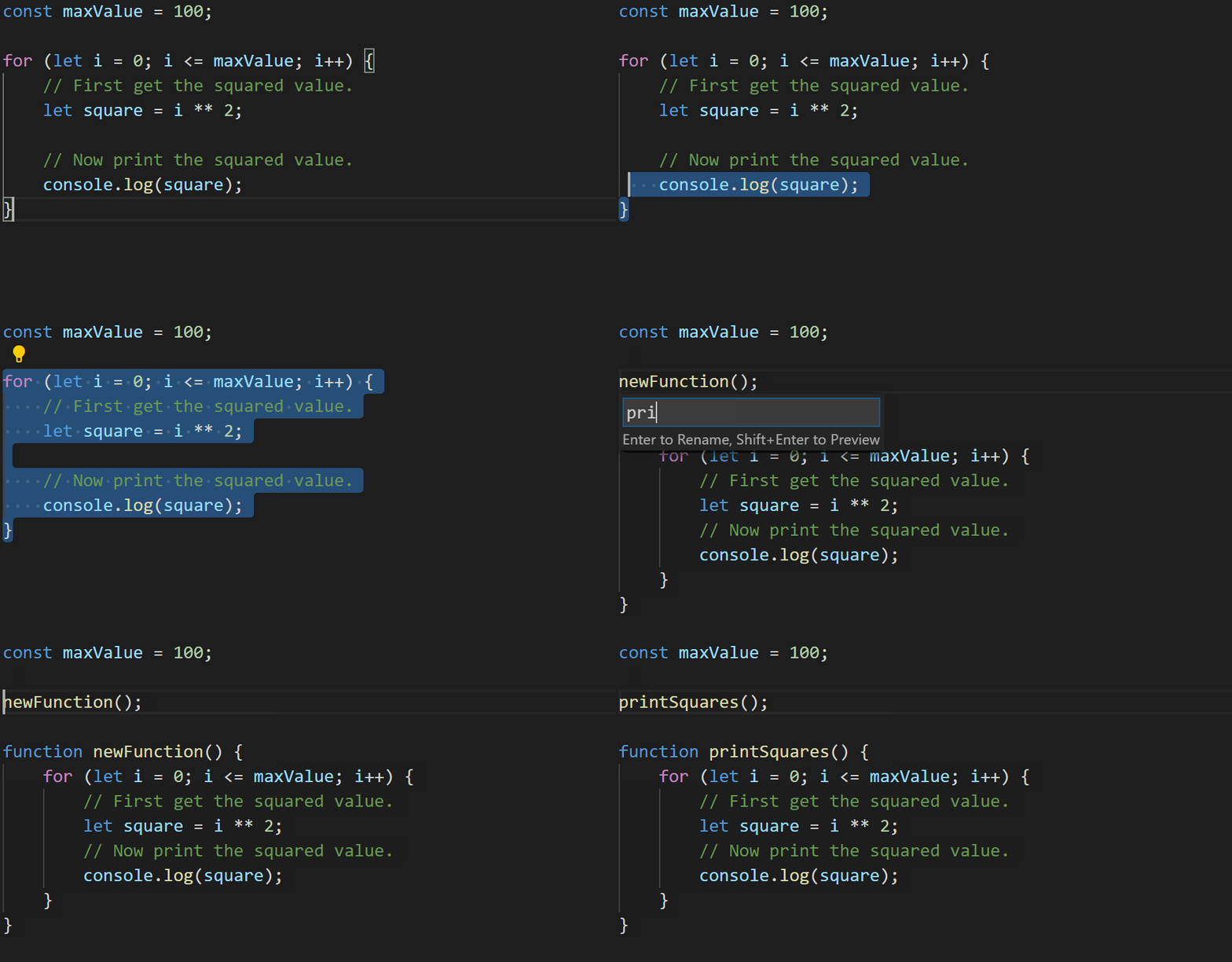
TypeScript's refactoring and quick fixes often didn't do much to keep newlines.
As a basic example, consider the following code:
constmaxValue=100;/*시작*/for(leti=0;i<=maxValue;i++){// 먼저 제곱 값을 구한다.letsquare=i**2;// 제곱 값을 출력한다.console.log(square);}/*끝*/
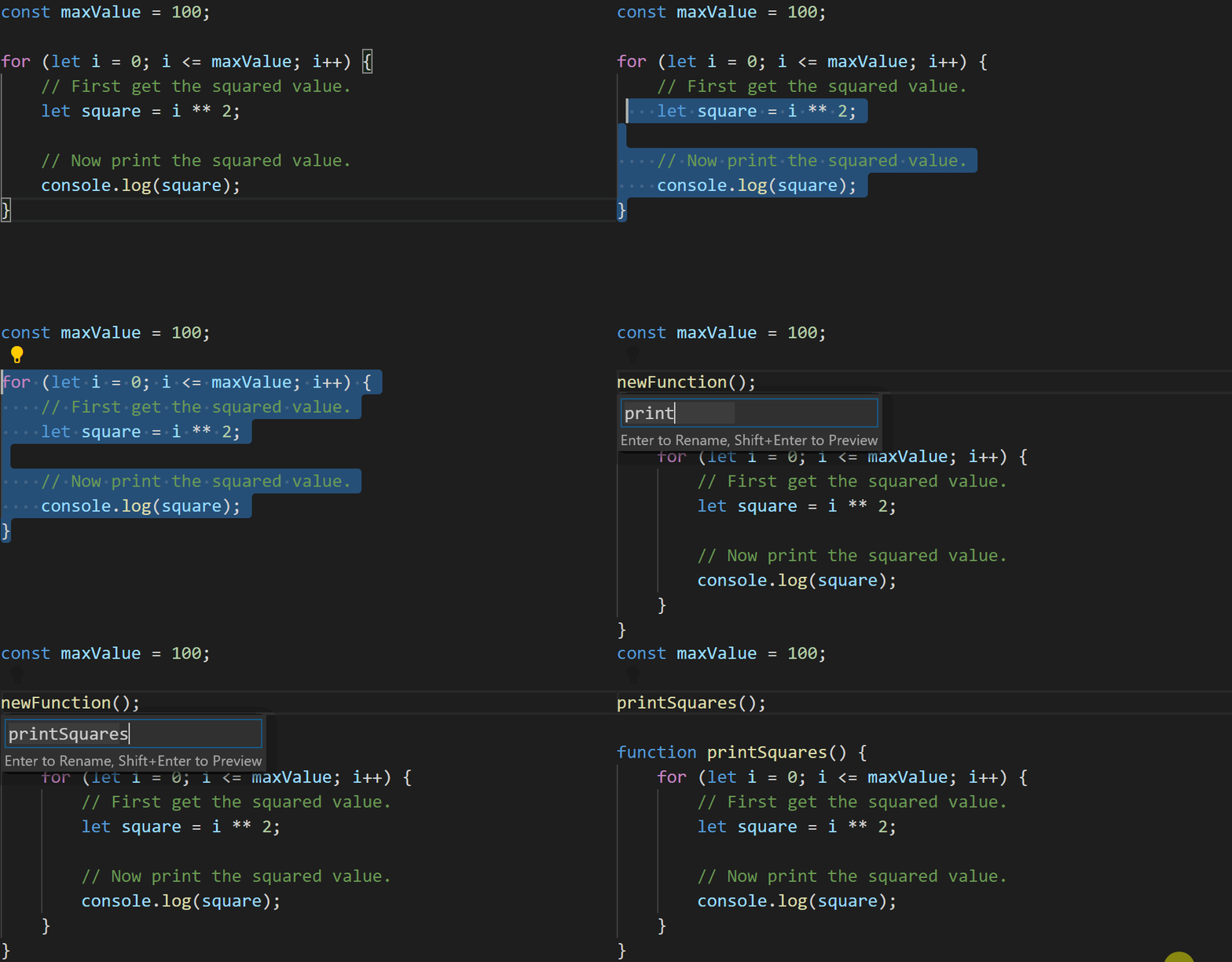
In the Editor /*시작*/ In /*끝*/ If you highlight the range up to and extract it into a new function, you will get the following code:
constmaxValue=100;printSquares();functionprintSquares(){for(leti=0;i<=maxValue;i++){// 먼저 제곱 값을 구한다.letsquare=i**2;// 제곱 값을 출력한다.console.log(square);}}
This is not ideal - for There was a blank line between each door in the loop, but the refactoring got rid of it!
TypeScript 3.9 does a little more to preserve what we write.
constmaxValue=100;printSquares();functionprintSquares(){for(leti=0;i<=maxValue;i++){// 먼저 제곱 값을 구한다.letsquare=i**2;// 제곱값을 출력한다.console.log(square);}}
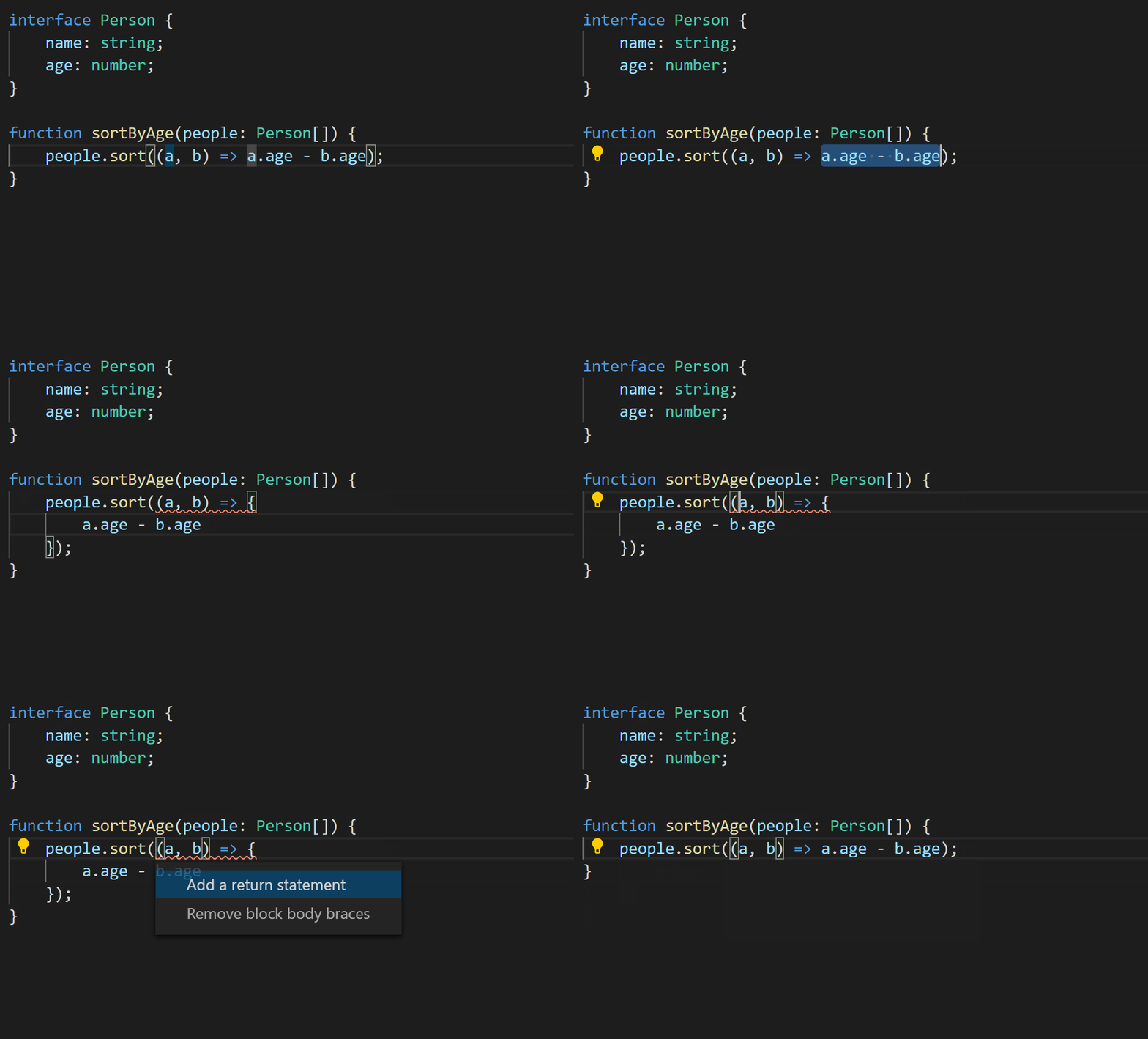
Especially when you add braces to an arrow function, you may forget to return the value of the last statement in the function.
// 이전letf1=()=>42// 실수 - 동일하지 않음!letf2=()=>{42}
Community Members Wenlu Wangof pull request Thanks to this, TypeScript is missing return You can provide a quick-fix to add statements, remove braces, or add parentheses to the arrow function body that looks like an object literal.
tsconfig.json Support for "Solution Style" tsconfig.json Files)
The editor needs to figure out which configuration files belong so that the appropriate options can be applied, and what other files are currently included in the "project".
By default, the editor that TypeScript's language server affects goes up along each parent directory. tsconfig.jsonDo this by finding .
One of the occasions when this problem somewhat failed was when tsconfig.json simply existed to reference another tsconfig.json file.
This file, which only manages other project files, is often referred to as a "solution" in some environments.
Here tsconfig.*.json None of the files are detected by the server, but are currently .ts The file is in the root of the tsconfig.jsonI want the language server to understand that it belongs to one of the projects mentioned in .
Parsing Differences in Optional Chaining and Non-Null Assertions
Recently, TypeScript introduced an optional chaining operator, but it is not a null assertive operator (!Optional chaining ( ) used with?.) has received user feedback that its behavior is not very intuitive.
Specifically, in earlier versions, the code was
foo?.bar!.baz
It was interpreted the same as the following JavaScript:
(foo?.bar).baz
In the code above, the parentheses will stop the "short" behavior of the optional chaining, so if fooprice undefinedBehind the scenes, bazAccessing will result in a runtime error.
The Babel team that pointed out this behavior and most of the users who gave feedback believe it is incorrect.
We think so! barIn the type of nulland undefinedThe most heard word is that it is the intention to get rid of the ! The operator is just "should disappear".
In other words, most people believe that the original sentence is as follows:
foo?.bar.baz
fooprice undefinedWhen it does, just undefinedI think it should be interpreted as evaluating as
While this is a major change, I think most of the code was written with the new interpretation in mind.
Users who want to revert to the previous behavior ! You can add explicit parentheses to the left of the operator.
(foo?.bar)!.baz
} and > is now an invalid JSX text character (} and > are Now Invalid JSX Text Characters)
JSX statements have a text location in }and > The use of characters is prohibited.
TypeScript and Babel decided to apply this rule more appropriately.
A new way to put this character is by using HTML escape code (for example, <span> 2 > 1 </div>) is to put the expression as a string literal (e.g. <span> 2 {">"} 1 </div).
fortunately Brad Zacherof pull request thanks to this you may receive an error message with the following sentence
Unexpected token. Did you mean `{'>'}` or `>`?
Unexpected token. Did you mean `{'}'}` or `}`?
For example:
letdirections=<span>Navigate to: Menu Bar >Tools>Options</div>// ~ ~// Unexpected token. Did you mean `{'>'}` or `>`?
Stricter Checks on Intersections and Optional Properties
generally A & BIntersection types such as A or Bprice CIf it can be assigned to , A & BThe Ccan be assigned to; However, sometimes there is a problem with optional properties.
For example, let's see:
interfaceA{a: number;// 'number' 인 것에 주목}interfaceB{b: string;}interfaceC{a?: boolean;// 'boolean' 인것에 주목b: string;}declareletx: A&B;declarelety: C;y=x;
In previous versions of TypeScript: Aprice CAlthough not fully compatible with, Bprice CCompatible with Was Because it was allowed.
In TypeScript 3.9, if all types in an intersection are salvific object types, the type system considers all properties at once.
As a result, TypeScript is A & Bof a Properties are Cof a I don't think it's compatible with the property:
'A & B' 타입은 'C' 타입에 할당할 수 없습니다.
  'a' 프로퍼티의 타입은 호환되지 않습니다.
    'number' 타입은 'boolean | undefined' 타입에 할당할 수 없습니다.
For more information about these changes, see The pull requestSee .
Intersections Reduced By Discriminant Properties
There are a few cases in which you might end up with a type that describes a value that doesn't exist.
For example
This code is Circleand SquareIt's a bit odd because there is no way to create an intersection of - two incompatible kind There is a field.
In previous versions of TypeScript, this code was allowed. "circle" & "square"price 절대(never) Because you described a set of values that cannot exist kind The type of itself is neverWas.
In TypeScript 3.9, the type system is more aggressive − kind Because of the properties Circleand SquareI know it's impossible to cross .
so z.kindneverInstead of collapsing to , z The self (Circle & Squarea) type neverCollapse to .
In other words, the above code throws the following error:
'kind' 프로퍼티는 'never' 타입에 존재하지 않습니다.
Most of the errors I've observed seem to match an invalid type declaration.
For more information, see Original pull requestTake a look.
Getters/Setters are No Longer Enumerable
In previous versions of TypeScript, the class getand set The accessors were released in an enumerable way; but getand setdid not follow the ECMAScript specification that it cannot be enumerated.
As a result, TypeScript code that targets ES5 and ES2015 may have different behaviors.
GitHub users pathursof pull request Thanks to this, TypeScript 3.9 is more closely compatible with ECMAScript in this regard.
anyType parameters extended to no longer any Type Parameters That Extend any No Longer Act as any)
In previous versions of TypeScript anyType parameters limited to anyWe were able to deal with it.
functionfoo<Textendsany>(arg: T){arg.spfjgerijghoied;// 오류가 아님!}
This was a mistake, so TypeScript 3.9 takes a more conservative approach and throws errors for these suspicious operations.
functionfoo<Textendsany>(arg: T){arg.spfjgerijghoied;// ~~~~~~~~~~~~~~~// 'spfjgerijghoied' 프로퍼티는 'T' 타입에 존재하지 않습니다.}
export *is always maintained (export * is Always Retained)
In previous versions of TypeScript export * from "foo" The same declaration is fooIf does not export any value, it is excluded from the JavaScript output.
This kind of export is problematic because it is type-oriented and cannot be emulated in barbell.
TypeScrip 3.9 is like this export * Declarations are always exported.
In fact, I don't think this change will break existing code.
More libdom.d.ts refinements
TypeScript's built-in .d.ts right from the Web IDL file. Built-in .d.ts of DOM-compliant TypeScript so that libraries (lib.d.ts and families) can be generated. I'm still working on moving the library.
As a result, some vendor-specific types related to media access have been removed.
If you add this file to your project's ambient *.d.ts file, you can recover it back:
Although this feature may not be a no-brainer for most users; --isolatedModules, TypeScript transpileModule If you encounter a problem with the API, or Babel, it may be related to this feature.
TypeScript 3.8 adds a new syntax for type-only imports, exports.
import typeimports only declarations that will be used for type notation and declarations.
This means that All the time It is completely removed, so there is nothing left at runtime.
likewise export typeprovides only exports for use in the type context, which is also removed from the TypeScript's output.
It's important to note that classes have values at runtime, have types at design-time, and their use is contextual-dependent.
To import a class import typeWith , you can't do anything like extensions.
importtype{Component}from"react";interfaceButtonProps{// ...}classButtonextendsComponent<ButtonProps>{// ~~~~~~~~~// error! 'Component' only refers to a type, but is being used as a value here.// ...}
If you've used Flow before, the syntax is quite similar.
One difference is that I put some restrictions in place to make the code look vague.
// 'Foo'만 타입인가? 혹은 모든 import 선언이 타입인가?// 이는 명확하지 않기 때문에 오류로 처리합니다.importtypeFoo,{Bar,Baz}from"some-module";// ~~~~~~~~~~~~~~~~~~~~~~// error! A type-only import can specify a default import or named bindings, but not both.
import typeAlong with , TypeScript 3.8 adds a new compiler flag to control what happens with an unused import at run time: importsNotUsedAsValues.
This flag has 3 different values:
remove: This is the current behavior of removing imports, and will continue to work as the default, not a change that replaces the existing behavior.
preserve: This means that all unused values are _conservation_The. This can preserve imports/side-effects.
error: This means that all (preserve option) preserves all imports, but throws an error if the import value is used only as a type. This is useful when you don't accidentally import the value, but you want to explicitly create a side effect import.
For more information about this feature, import typeExpanding the scope for which declarations can be used pull requestand Related changesYou can find it here.
classPerson{
#name: stringconstructor(name: string){this.#name =name;}greet(){console.log(`Hello, my name is ${this.#name}!`);}}letjeremy=newPerson("Jeremy Bearimy");jeremy.#name
// ~~~~~// 프로퍼티 '#name'은 'Person' 클래스 외부에서 접근할 수 없습니다.// 이는 비공개 식별자를 가지기 때문입니다.
Common properties (private Unlike anything you declare as a specifier), private fields have a few rules to keep in mind.
Some of them are:
The private field is # Starts with a letter. Sometimes it is possible to do this Private names Called.
All private field names are unique in the class scope that contains them.
public or private The same TypeScript access specifier cannot be used as a private field.
Even from JS users, private fields cannot be accessed or detected outside of the class that contains them! Sometimes it is possible to do this Hard privacy Call.
Apart from the "strong" private, another advantage of a private field is that it is unique.
For example, a typical property declaration is easy to overwrite in a subclass.
classC{foo=10;cHelper(){returnthis.foo;}}classDextendsC{foo=20;dHelper(){returnthis.foo;}}letinstance=newD();// 'this.foo' 는 각 인스턴스마다 같은 프로퍼티를 참조합니다.console.log(instance.cHelper());// '20' 출력console.log(instance.dHelper());// '20' 출력
In private fields, you don't have to worry about this because each field name is unique in the class you contain.
classC{
#foo =10;cHelper(){returnthis.#foo;}}classDextendsC{
#foo =20;dHelper(){returnthis.#foo;}}letinstance=newD();// 'this.#foo' 는 각 클래스안의 다른 필드를 참조합니다.console.log(instance.cHelper());// '10' 출력console.log(instance.dHelper());// '20' 출력
Another thing that is good to know is that if you approach a private field with a different type, TypeError is that it happens.
classSquare{
#sideLength: number;constructor(sideLength: number){this.#sideLength =sideLength;}equals(other: any){returnthis.#sideLength ===other.#sideLength;}}consta=newSquare(100);constb={sideLength: 100};// Boom!// TypeError: attempted to get private field on non-instance// 이는 `b` 가 `Square`의 인스턴스가 아니기 때문에 실패 합니다.console.log(a.equals(b));
As a subtitle, all plain .js For file users, the private field is All the time It must be declared before it can be assigned.
JavaScript has always allowed users access to undeclared properties, but TypeScript has always required class property declarations.
The private field is, .js or .ts You always need a declaration, regardless of whether it works on the file.
As a TypeScript user, I've already been asked a lot of questions about what kind of private I should use: mainly, "private Should I use keywords or hashes/wells in ECMAScript (#) Should I use a private field?"
Every situation varies!
In the property, the TypeScript private The specifier is completely cleared - it behaves like a completely normal property at runtime, and this is why private There is no way to say that it has been declared as a specifier. private When using keywords, non-disclosure is enforced only at compile-time/design-time, and is entirely intention-based for JavaScript users.
classC{privatefoo=10;}// 이는 컴파일 타임에 오류이지만// TypeScript 가 .js 파일로 출력했을 때는// 잘 동작하며 '10'을 출력합니다.console.log(newC().foo);// '10' 출력// ~~~// error! Property 'foo' is private and only accessible within class 'C'.// TypeScript 오류를 피하기 위한 "해결 방법" 으로// 캄파일 타임에 이것을 허용합니다.console.log(newC()["foo"]);// prints '10'
This kind of "soft privacy" helps users work temporarily without access to the API, and it works at any runtime.
On the other hand, ECMAScript's # Private is completely inaccessible outside of class.
classC{
#foo =10;}console.log(newC().#foo);// SyntaxError// ~~~~// TypeScript 는 오류를 보고 하며 *또한*// 런타임에도 동작하지 않습니다.console.log(newC()["#foo"]);// undefined 출력// ~~~~~~~~~~~~~~~// TypeScript 는 'noImplicitAny' 하에서 오류를 보고하며// `undefined`를 출력합니다.
This kind of hard privacy is useful for strictly ensuring that no one can use the interior.
If you are a library author, removing or renaming private fields should not result in drastic changes.
As mentioned, the other advantages of ECMAScript # Private Price real It's just that it's private, so you can easily do subclassing.
ECMAScript # With private fields, no subclass has to worry about fieldnaming conflicts.
TypeScript privateIn a property declaration, the user must still be careful not to trample on the property declared in the parent class.
One more thing to think about is where you intend your code to run.
Currently, TypeScript cannot support this feature unless it targets ECMAScript 2015 (ES6) or a later version.
This means that low-level implementations are forced to be private. WeakMapto use, WeakMapThis is because it cannot be polyfilled to avoid losing memory leaks.
On the other hand, TypeScript's private- Declarative properties work on all targets - even in ECMAScript3!
The last consideration may be speed: private Because a property is no different from any other property, it can target any runtime and be as fast as any other property at the bottom.
On the other hand # The private field is WeakMapBecause you are downleveling with , it may slow down your usage.
What runtime is # Optimize private field implementation, faster WeakMapYou may want to implement , but this may not be the case at all runtimes.
export * as ns Syntax (export * as ns Syntax)
It is often common to have a single entry point that exports all members of different modules as one member.
This is so common that ECMAScript2020 recently added a new syntax to support this pattern.
export*asutilitiesfrom"./utilities.js";
This is a great quality of life improvement for JavaScript, and TypeScript 3.8 supports this syntax.
Module target es2020 If it was the former, TypeScript would print something along the snippet of code on the first line.
Top-Level await (Top-Level await)
TypeScript 3.8 states that "top-level" awaitSupports a handy ECMAScript function called "ECMAScript".
JavaScript users awaitTo use the async You often introduce a function, and after you define it, you call the function immediately.
In previous JavaScript (along with most other languages with similar functionality) awaitsilver async Because it was only allowed within the function.
But top-level awaitBy, we are at the top level of the module awaitYou can use .
Here's a point to keep in mind: Top-Level awaitsilver _module_Only works at the top level of , and the file is not TypeScript importI exportis considered a module only when it is found.
In some basic cases export {}It is necessary to verify this by creating a boilerplate such as .
In all environments where this is expected, the top level awaitmay not work.
present target Compiler options es2017 It is ideal, moduleTwo esnext or systemOnly the top level is awaitYou can use .
Support in some environments and bundlers may work with limitations or you may need to enable experimental support.
es2020dragon targetand module (es2020 for target and module)
TypeScript 3.8 is es2020moduleand target Support as an option.
This allows for optional chaining, nullish coalescing, export * as ns and dynamic import(...) ECMAScript 2020 functionality, such as syntax, is preserved.
In addition bigint Literal esnext Stable under targetIt means having a .
JSDoc Property Modifiers
TypeScript 3.8 is allowJs Supports JavaScript files with flags checkJs Options or // @ts-check Comments .js Add to the top of the file to the JavaScript file _Type-Inspection_Supported.
Because JavaScript files do not have a dedicated syntax for type-checking, TypeScript leverages JSDoc.
TypeScript 3.8 recognizes several new JSDoc tags for properties.
First is the access specifier: @public, @private and @protectedIs.
Each of these tags is within TypeScript. public, private, protectedWorks the same as .
// @ts-checkclassFoo{constructor(){/** @private */this.stuff=100;}printStuff(){console.log(this.stuff);}}newFoo().stuff;// ~~~~~// 오류! 'stuff' 프로퍼티는 private 이기 때문에 오직 'Foo' 클래스 내에서만 접근이 가능합니다.
@publicis always implicit and can be omitted, but it means that the property is accessible from anywhere.
@privatemeans that the property is available only within the class containing the property.
@protectedcan use that property within the class containing the property and any derived subclasses, but instances of the containing class cannot use that property.
Next: @readonly Add a specifier to ensure that the property is only used within the initialization process.
// @ts-checkclassFoo{constructor(){/** @readonly */this.stuff=100;}writeToStuff(){this.stuff=200;// ~~~~~// 'stuff'는 읽기-전용(read-only) 프로퍼티이기 때문에 할당할 수 없습니다.}}newFoo().stuff++;// ~~~~~// 'stuff'는 읽기-전용(read-only) 프로퍼티이기 때문에 할당할 수 없습니다.
Better directory monitoring in Linux watchOptions
In TypeScript 3.8, node_modulesprovides a new directory witness strategy that is important for efficiently collecting changes.
In an operating system such as Linux, TypeScript is node_modulesInstall directory watchers (as opposed to file watchers) on , and many subdirectories to detect dependency changes.
Because the number of available file watchers is often node_modulesis obscured by the number of files in , and because the number of directories to track is small.
Earlier versions of TypeScript put watchers in a folder in the directory promptly Install it, and it should be fine initially; But, when you install npm, node_modulesA lot of things will happen inside, and it will overwhelm TypeScript, often making the editor session very slow.
To prevent this, TypeScript 3.8 waits a bit before installing directory watcher to give highly volatile directories time to be stable.
Because every project may work better with a different strategy, and this new approach may not work well in your workflow. TypeScript 3.8 allows you to tell the compiler/language service what watchdog strategy to use to monitor files and directories. tsconfig.jsonand jsconfig.jsonat watchOptionsprovides a new field.
{// 일반적인 컴파일러 옵션들"compilerOptions": {"target": "es2020","moduleResolution": "node",// ...},// NEW: 파일/디렉터리 감시를 위한 옵션"watchOptions": {// 파일과 디렉터리에 네이티브 파일 시스템 이벤트 사용"watchFile": "useFsEvents","watchDirectory": "useFsEvents",// 업데이트가 빈번할 때// 업데이트하기 위해 더 자주 파일을 폴링"fallbackPolling": "dynamicPriority"}}
watchOptionsincludes 4 new options that you can configure.
watchFile: Strategy of how to watch each file. You can set it up as follows:
fixedPollingInterval: Checks for changes to all files several times in 1 second at fixed intervals.
priorityPollingInterval: Changes to all files are scanned several times in 1 second, but heuristics are used to scan files of one type less frequently than other types of files.
dynamicPriorityPolling: Uses dynamic queues to check fewer files that are modified less frequently.
useFsEvents (default): Uses OS/file system native events for file changes.
useFsEventsOnParentDirectory: When detecting a change to a directory containing a file, it uses the native events of the operating system/file system. You can use less file watcher, but it may be less accurate.
watchDirectory: A strategy in which the entire directory tree is watched within a system that does not have recursive file-watching. You can set it up as follows:
fixedPollingInterval: Checks for changes to all directories at fixed intervals several times in 1 second.
dynamicPriorityPolling: Use dynamic queues to examine less frequently modified directories.
useFsEvents (default): Uses OS/file system native events for directory changes.
fallbackPolling: When using file system events, this option specifies the polling strategy used when the system lacks native file watcher and/or does not support it. You can set it up like this:
fixedPollingInterval: (See above.)
priorityPollingInterval: (See above.)
dynamicPriorityPolling: (See above.)
synchronousWatchDirectory: Disables deferred supervision of directories. Deferred watch is useful when many files are changed at once (for example, npm installRun the node_modulesof changes), but can also be disabled for less-general settings.
For more information about this change, go to Github the pull requestRead on.
"Fast and loose" incremental checking
TypeScript 3.8 has new compiler options assumeChangesOnlyAffectDirectDepenciesto provide.
When this option is enabled, TypeScript does not rescan/rebuild files that are really affected, but only rescans/rebuilds files that have been imported directly, as well as changed files.
For example, as follows: fileA.tsImport a fileB.tsImport a fileC.tsImport a fileD.tsLet's take a look at:
fileA.ts <- fileB.ts <- fileC.ts <- fileD.ts
--watch In mode, fileA.tsThe change of fileB.ts, fileC.ts and fileD.tsThis means that TypeScript must be re-checked. assumeChangesOnlyAffectDirectDependenciesIn fileA.tsThe change of fileA.tsand fileB.tsYou only need to re-check.
In a code base like Visual Studio Code, we've reduced the rebuild time from about 14 seconds to about 1 second for changes to certain files.
This option is not recommended for all code bases, but if you have a large code base and are willing to defer the entire project error until later (for example, tsconfig.fullbuild.jsonor a dedicated build via CI) would be interesting.
Merging because @bumkeyy is a code-owner of all the changes - thanks!
This file contains hidden or bidirectional Unicode text that may be interpreted or compiled differently than what appears below. To review, open the file in an editor that reveals hidden Unicode characters.
Learn more about bidirectional Unicode characters
Add this suggestion to a batch that can be applied as a single commit.This suggestion is invalid because no changes were made to the code.Suggestions cannot be applied while the pull request is closed.Suggestions cannot be applied while viewing a subset of changes.Only one suggestion per line can be applied in a batch.Add this suggestion to a batch that can be applied as a single commit.Applying suggestions on deleted lines is not supported.You must change the existing code in this line in order to create a valid suggestion.Outdated suggestions cannot be applied.This suggestion has been applied or marked resolved.Suggestions cannot be applied from pending reviews.Suggestions cannot be applied on multi-line comments.Suggestions cannot be applied while the pull request is queued to merge.Suggestion cannot be applied right now. Please check back later.


 Jonghakseo
changed the title
Jonghakseo
changed the title


In the Korean release notes document, toc malfunctions due to unnecessary span tags.